Like it or not, GitHub is where most developers already live - it's where code is written, reviewed, and shipped with or without AI. So rather than asking you to adapt your workflow to Juno, I've been working on bringing Juno closer to yours.
Two new features ship in that direction: a new recommended approach for automating deployments via GitHub Actions, and support for GitHub authentication in your applications 🚀.
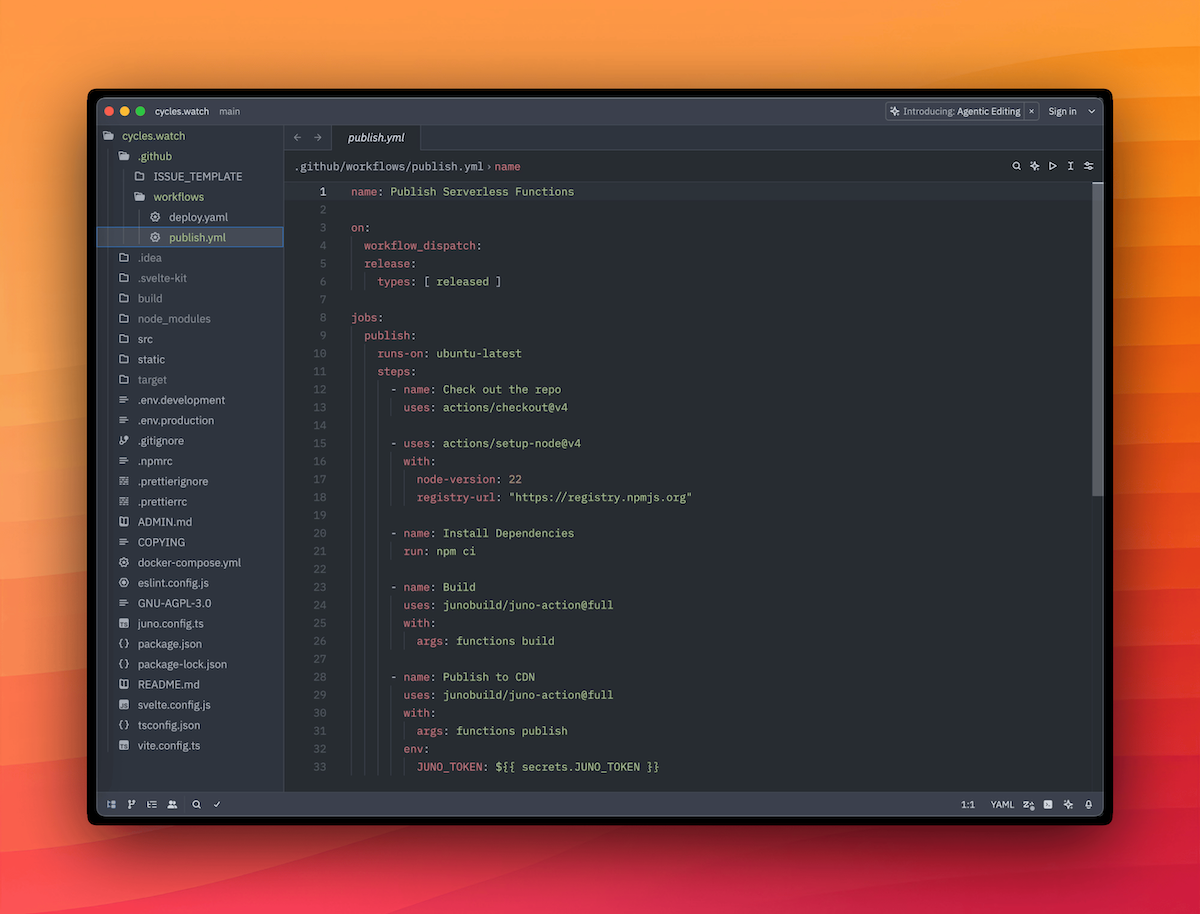
Until now, setting up GitHub Actions to deploy your frontend or publish serverless functions required storing a JUNO_TOKEN in your GitHub secrets. It worked, but it came with the usual headaches, tokens to generate, rotate, and keep out of the wrong hands.
The new recommended approach uses OpenID Connect (OIDC). Instead of a static token, GitHub and your Satellite establish a trust relationship, and each workflow run gets short-lived credentials (access keys) automatically. Once the run is done, the credentials are gone.
No tokens to rotate. No secrets to manage. And if a workflow is ever compromised, there's nothing long-lived to steal.
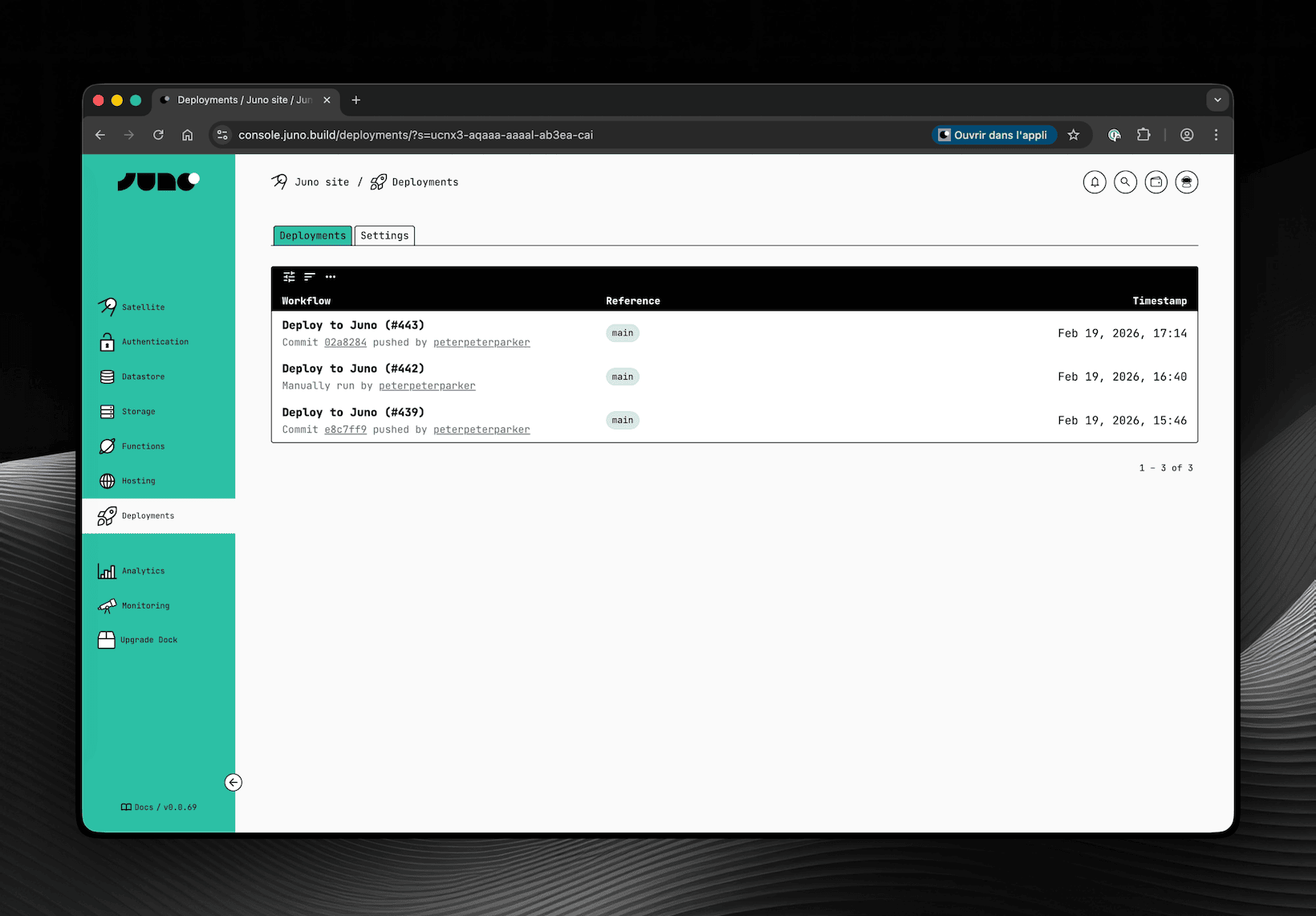
To support this, a new Deployments screen has been added to the Console. This is where you configure which repositories are allowed to deploy to your Satellite and where you can review past deployments.
tip
Obviously and as always, you can also configure the same options with your CLI if you prefer.
You can now add GitHub authentication to your application, letting your users sign in with their GitHub account, a natural fit for developer-facing apps.
Unlike other providers, GitHub does not natively support OpenID Connect. That's why this authentication requires a small proxy that handles the OAuth exchange securely to avoid exposing a client secret directly within your Satellite.
Juno provides an open-source API for this: github.com/junobuild/api. You self-host it, point your configuration to it, and from there the flow is straightforward, the user signs in, the proxy issues a JWT, your Satellite verifies it, and a session is created.
One thing to be aware of though: because the proxy signs JWTs with RSA keys, your Satellite needs access to those public keys to verify them. Rather than having each Satellite make HTTPS outcalls to your proxy on every request, Juno uses a shared infrastructure module called Observatory to fetch and cache those keys. Since you're self-hosting the proxy, you'll also need to deploy your own Observatory instance and configure it to point to your proxy's JWKS endpoint.
It's a bit tricky to set up but worth the effort if you're targeting developers. Reach out if you have questions, always happy to help!
One could argue that instead of improving the integration with GitHub, I should spin up custom infrastructure and provide the entire CI/CD for building and deploying. I wouldn't disagree. If the goal were to compete with cloud providers like AWS, Vercel, you name it, that would probably be the path. But devops is not really my thing, and that would be quite an effort both in terms of development and maintenance for the sole developer I am, who already takes care of a gigantic codebase 😅. Maybe someday, but honestly it feels unlikely as I doubt Juno will ever become a company.
Until then, I think this is a great step in the right direction - a tighter integration between Juno and the tools you already use day to day. Hope you find it useful too!
One of the principles that shaped Juno from day one was the idea of building apps with full ownership — no hidden infrastructure, no opaque servers.
No hypocrisy either.
If developers are encouraged to deploy code in containers they control, it feels inconsistent to rely on centralized infrastructure — like AWS or other Web2 cloud providers — to manage deployment pipelines or run the platform. With the exception of email notifications, Juno currently runs entirely on the Internet Computer — and that's a deliberate choice.
That doesn't mean being stubborn for the sake of it. It just means trying to push things forward without falling back on the old way unless absolutely necessary.
At the same time, developer experience matters — a lot. It shouldn't take a degree in DevOps to ship a backend function. Developers who would typically reach for a serverless option should be able to do so here too. And for those who prefer to stay local, it shouldn't feel like a downgrade — no one should be forced into CI automation if they don't want to.
That's why the new GitHub Actions for serverless functions are now generally available — for those who want automation, not obligation.
Build serverless functions written in TypeScript or Rust
Automatically publish them to a Satellite
Optionally propose or directly apply upgrades
All within a GitHub Actions workflow. No manual builds, no extra setup — just code, commit, and push.
This makes it easier to fit Juno into an existing CI/CD pipeline or start a new one from scratch. The logic is bundled, metadata is embedded, and the container is ready to run.
You might ask yourself: "But what about the risk of giving CI full control over my infrastructure?"
That's where the improved access key (previously named "Controllers") roles come in.
Instead of handing over the master key, you give CI just enough access to do its job — and nothing more.
Here's how the roles break down in plain terms:
Administrator – Full control. Can deploy, upgrade, stop, or delete any module. Powerful, but risky for automation. Might be useful if you're spinning up test environments frequently.
Editor (Write) – Ideal for CI pipelines that deploy frontend assets or publish serverless functions. Can't upgrade those or stop and delete modules. A good default.
Submitter 🆕 – The safest option. Can propose changes but not apply them. Someone still needs to review and approve in the Console or CLI. No surprises, no accidents.
Use Editor for most CI tasks — it gives you automation without opening the blast radius.
Prefer an extra layer of review? Go with Submitter and keep a human in the loop.
Nothing changes in the approach for developers who prefer local development. The CLI remains a first-class tool for building and deploying.
All the new capabilities — from publishing functions to proposing or applying upgrades — are available not just in GitHub Actions or the Console UI, but also fully supported in the CLI.
In fact, the CLI has been improved with a neat addition: you can now append --mode development to interact with the emulator. This allows you to fully mimic production behavior while developing locally. And of course, you can also use any mode to target any environment.
While building serverless functions was never an issue, enabling GitHub Actions to publish and deploy without giving away full control introduced a challenge. How do you let CI push code without handing it the keys to everything?
That's where the idea of a sort of CDN came in.
Each Satellite now has a reserved collection called #_juno/releases. It's like a staging area where CI can submit new WASM containers or frontend assets. If the access key has enough privileges, the submission is deployed right away. If not, it's stored as a pending change — waiting for someone to approve it manually via the Console or CLI.
This builds on the change-based workflow that was added to the Console last year. Funny enough, it brought the Console so close to being a Satellite itself that it became... basically a meta example of what you can build with Juno.
And here's the cherry on top: because there's now a CDN tracking versions, developers can rollback or switch between different function versions more easily. A new CDN tab in the Console UI (under Functions) gives you access to all past versions and history.
Frontend deployment now benefits from the same change-based workflow. By default, when you run juno deploy or trigger a GitHub Action, the assets are submitted as pending changes — and applied automatically (if the access key allows it).
Want to skip that workflow? You still can. The immediate deployment path remains available — handy if something fails, or if you just prefer to keep things simple.
That's because the GitHub Action now comes in two flavors:
junobuild/juno-action or junobuild/juno-action@slim – perfect for common use cases like deploying frontend assets or running simpler CLI tasks. No serverless build dependencies included, so it's faster and more "lightweight" (relatively, it still uses Docker underneath...).
junobuild/juno-action@full – includes everything you need to build and publish serverless functions, with Rust and TypeScript support. It's heavier, but it does the job end to end.
This release isn't just about smoother deployments — it's a step toward making Juno feel like real infrastructure. Though, what is “real infrastructure” anyway? Whatever it is, this one doesn't come with the usual baggage.
Developers get to choose how they ship — locally or through CI. They get to decide what gets deployed and who can do it. They're not forced to rely on some big tech platform for their infra if they don't want to. And thanks to the new CDN and access control model, fast iteration and tight control can finally go hand in hand.
If you've been waiting for a way to ship backend logic without giving up on decentralization — or if you just like things working smoothly — this one's for you.
Go ahead.
Build it.
Push it.
Submit it.
Ship it.
To infinity and beyond,
David
Stay connected with Juno by following us on X/Twitter.